Check a School Flyer Before You Print Fifty Copies
The four details to read letter by letter on any event flyer, how to write lines an AI flyer maker keeps intact, and what to check on the finished print.
A flyer has one job: get the right people to the right place at the right time. Everything else on it is decoration. So before a flyer goes into fifty book bags, read four things letter by letter: the date, the time, the place and how to take part. A wrong colour costs nothing; a wrong date empties the hall.
Why AI flyers go wrong on the details
Most AI flyer generators let a language model rewrite your text before an image model draws it. Rewrites are where "Saturday 9 May" turns into "Saturday 19 May" or "10am" becomes "10:00 pm". Then the image model can slip again while lettering.
BananaFlash.org splits those two risks. The checker (Gemini 3 Flash by Google) may fix a misspelt word, but if any digit in a line changes, your original line is put back exactly as you typed it. You then read and approve every line before Nano Banana Pro by Google draws it. What is left is the lettering itself, which is why the last check happens on the finished flyer.
Write lines the drawing can keep
The way you type the lines decides how cleanly they come out.
| Instead of | Write |
|---|---|
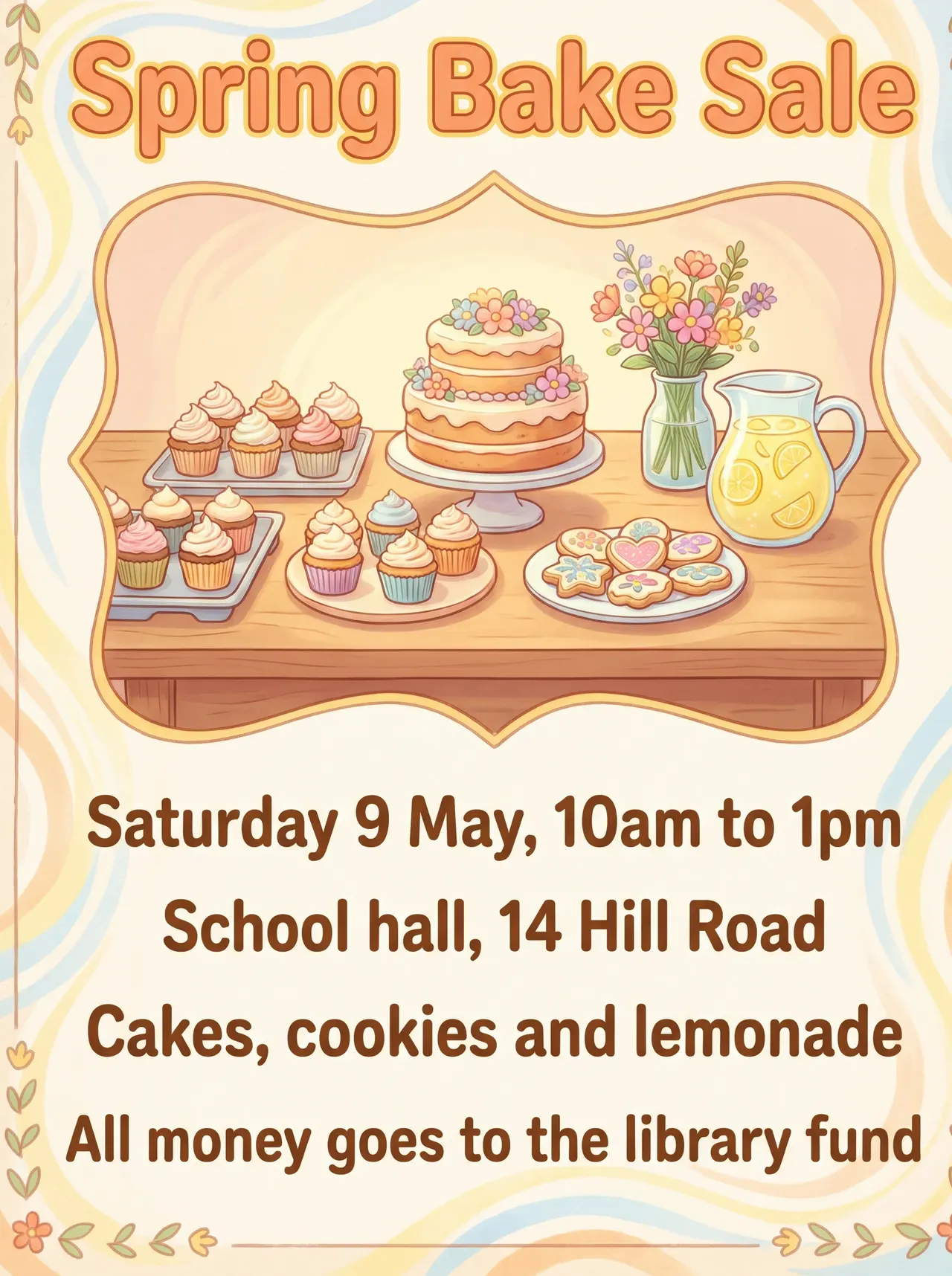
| "Come along on the 9th from ten till one" | "Saturday 9 May, 10am to 1pm" |
| "In the hall at school (the big one)" | "School hall, 14 Hill Road" |
| "Cakes and stuff, plus drinks probably" | "Cakes, cookies and lemonade" |
| "Money raised will go towards the library" | "All money goes to the library fund" |
- One fact per line. Date and time together, place on its own line, then what it is.
- Short headline. Six words or fewer: "Spring Bake Sale" reads from across a corridor.
- No small print. Long disclaimers turn into unreadable lettering. Put them in the newsletter.
- Up to six lines. More than that and every line gets smaller.
The four-point check on the finished flyer
Once it is drawn, hold the flyer next to your typed lines and compare:
- Date. Day name and number agree (is 9 May really a Saturday this year?).
- Time. Start and end, am and pm, nothing swapped.
- Place. Room name and street number, spelt as people know them.
- How to take part. The sign-up step, contact or "free, no booking needed".
If any of the four is off, draw it again. It costs 99 credits, the same as the first drawing, and the approved words stay the same.
Print it well
Download the PNG for email or a screen, or press Print PDF and choose A4 or Letter for paper. Portrait suits noticeboards and book bags; landscape suits newsletters and screens. Print one copy first and read it once more on paper before you print the stack.
What the flyer maker will not add
There are no uploads, so it cannot place your school logo or a photo of pupils, and it will not draw real people, brands or characters from books and films. If you need a logo, add it afterwards in your own editor. The facts on the flyer are yours to check: you approve every word, and the finished sheet is a picture of those words.
Costs at a glance
| What | Credits |
|---|---|
| One flyer | 99 |
| Drawing it again | 99 |
| A check you never draw | refunded after 24 hours |
New accounts get 25 free credits after email verification. Open the AI flyer maker to start, or see pricing for the Teacher plan and Staff Room seats.
Make your own sheet
Type the subject and your labels, check every word and see the price before anything is drawn.