How to Turn a Labelled Diagram into a Label-the-Diagram Quiz
Make one labelled diagram to teach with and the same picture with empty label boxes to test with: how to pick labels, check them and print both copies.
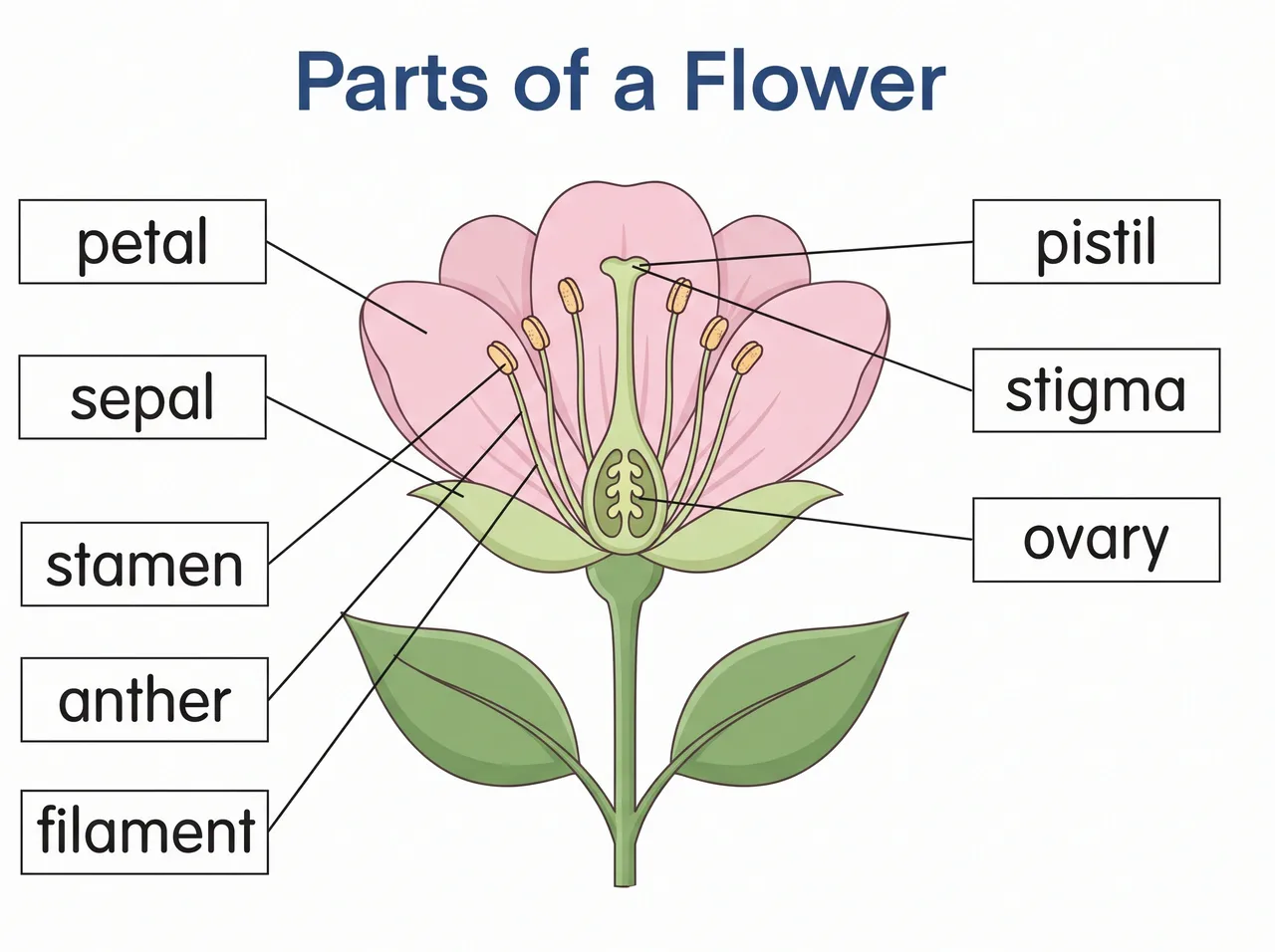
A label-the-diagram quiz works best when pupils see the same picture they learned from, with the words taken away. The quickest way to get that is to make the labelled diagram first, check every label, and then make a blank-label copy of that exact picture. On BananaFlash.org the labelled diagram costs 99 credits and the blank copy 35 more, and both print on A4 or Letter.
Why the same picture matters
When the quiz uses a different drawing from the lesson, pupils spend their effort working out what the new picture shows instead of recalling the words. A flower drawn from the side in the lesson and from above in the quiz is two tasks, not one. Keeping the picture identical, with the leader lines and the empty boxes in the same places, tests the vocabulary and nothing else.
That is also why the blank copy is made from the finished diagram rather than from your brief again. A fresh drawing would move things around; the blank copy keeps the layout and removes the label text.
Step 1: choose the labels before you open the studio
Decide what pupils must be able to name at the end of the topic, and stop there. For a flower at ages 8–10 that might be petal, sepal, stamen and pistil. For ages 14–18 you might add anther, filament, stigma, style and ovary.
- Fewer is clearer. Ten labels or fewer read well on A4. A diagram can hold up to twelve, but the boxes get small.
- Spell them the way you teach them. Case, hyphens and plurals are drawn as you approve them.
- One word or a short phrase per label. "Ovary" reads better than "the ovary, where seeds form".
- Bilingual classes: write both on one row, such as "petal / pétalo".
If you leave the list empty, the checker suggests the usual labels for the age group you pick, and you can edit them.
Step 2: read the check
Type the subject, for example "parts of a flower, cut in half so the inside shows", and the labels, one per row. Press Check my labels. Gemini 3 Flash by Google reads them, fixes spelling and leaves a note for each change ("Fixed 'sepel' to 'sepal'"). Every label appears as an editable row.
This is the step that saves a reprint. Read each row as if it were already on fifty copies. Add, remove or reword anything; editing is free because the credits were counted when you pressed Check.
Step 3: draw, then look at every leader line
Press Draw this sheet. Nano Banana Pro by Google, the model that handles lettering best, draws the diagram with your approved words. Most take 30 to 90 seconds.
Before you print, check one thing the spelling check cannot: that every leader line ends on the right part. An image model can draw a correct word pointing at the wrong place. If one is off, draw it again; it costs the same as the first drawing.
Step 4: make the blank-label copy
On the finished diagram, press Make a blank-label copy. It costs 35 credits and needs no new check. You get the same picture with the label boxes and leader lines kept and the words removed.
Look over the blank copy once:
| Check | Why |
|---|---|
| Every box is still there | the copy is redrawn, not edited pixel by pixel |
| No word is left behind | a leftover label gives the answer away |
| Boxes are big enough | younger pupils need room to write |
| The picture matches | if anything moved, make the copy again |
Step 5: print both
Download each copy as a PNG, or press Print PDF and pick A4 or Letter. The PDF is one page with margins that suit school printers. Hand out the labelled copy during the lesson and the blank copy for the quiz, or put both on one revision sheet: labelled on the left, blank on the right.
Ideas that work well
- Science: parts of a plant, the water cycle, the heart, a simple circuit, the layers of the Earth.
- Geography: a volcano in cross-section, a river from source to mouth, coastal landforms.
- Languages: a kitchen, a classroom or a body with the words in the language being learned.
- Revision: the same diagram at the start and end of a unit, to see what stuck.
Costs at a glance
| What | Credits |
|---|---|
| Labelled diagram | 99 |
| Blank-label copy | 35 |
| Drawing the diagram again | 99 |
A check or drawing that fails is refunded automatically, and a check you never draw closes after 24 hours and is refunded too. See pricing for the Teacher plan and the Term Pack, or open the labelled diagram maker to start.
Make your own sheet
Type the subject and your labels, check every word and see the price before anything is drawn.